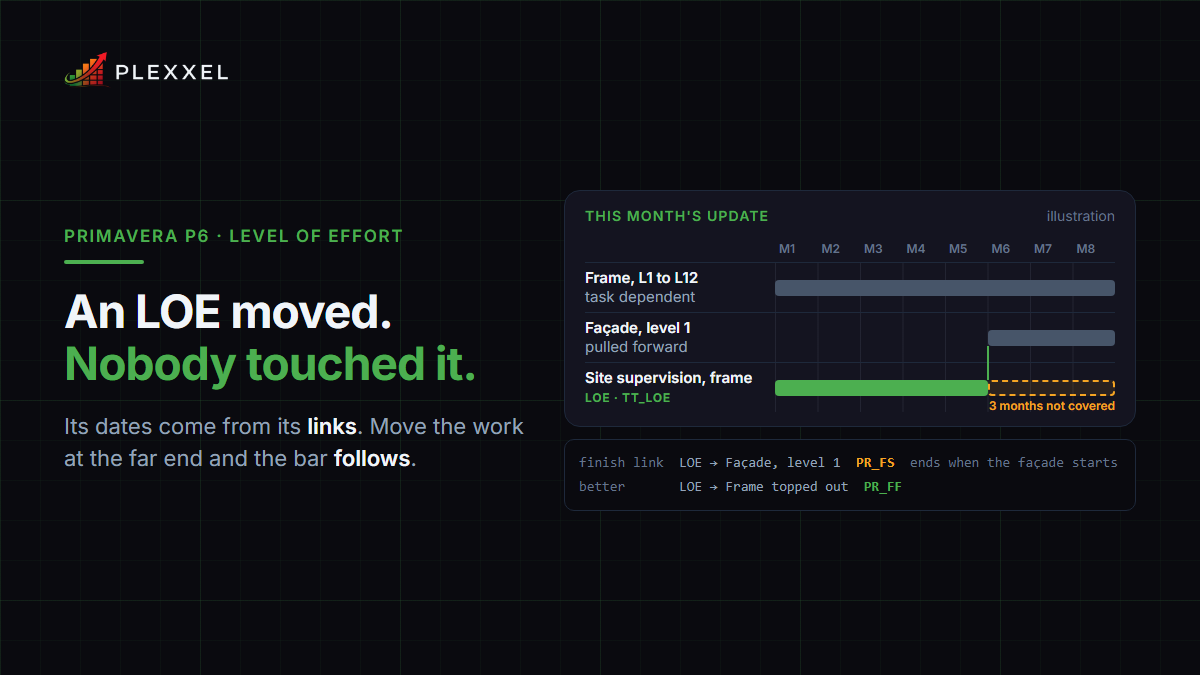
In this month's update, "Site supervision, frame" finishes three months before the frame does. Nobody touched it. It's a level of effort activity in Primavera P6, and its finish was tied to the first façade activity with a finish to start link. The update pulled the façade forward to start on the lower floors while the upper floors are still going up, and the supervision bar followed the link, not the frame.
That's the whole behaviour in one example. A level of effort activity has no duration of its own. Its start follows its predecessor links, its finish follows its successor links, and P6 works both out again every time you schedule. It drives nothing, so it can never delay the project. That's exactly why nobody notices when it ends up covering the wrong work.
How a level of effort activity gets its dates in Primavera
On an ordinary activity, a successor link means "I push that activity". On an LOE it means the opposite: "that activity tells me when to stop". Every link on an LOE is read from the other end.
So an SS link from the first activity it covers starts the LOE when that activity starts. Make it FS and the LOE waits until that activity finishes. At the other end, an FF link to the last activity ends the LOE when that activity finishes, and an FS link ends it when the successor starts. That last one is the link in the opening.
The duration is an output. Type one in and the next schedule run replaces it with the working time between those two dates, counted on the LOE's own calendar (clndr_id). Any hours or cost assigned to it are spread across that span. When the span moves, the histogram and the cash flow move with it, whether anyone meant them to or not.
In the XER there's nothing special to see. The LOE is a row in TASK with task_type TT_LOE, and its links sit in TASKPRED like any others: pred_task_id is the predecessor, task_id the successor, pred_type PR_SS, PR_FS or PR_FF. The difference is entirely in how P6 schedules them.
Why the link looked right when it was drawn
When the programme was built, the façade followed the frame. "Façade starts" and "frame finishes" fell on the same day, so tying the supervision to the façade's start was a reasonable shortcut. It was also a proxy. The LOE was never following the frame. It was following something that happened to sit next to the frame's end.
A proxy holds only while the sequence holds. The update changed the sequence for a good reason, to recover time, and whoever changed it was looking at the façade and the frame, not at a supervision bar three screens down.
Nothing flagged it either. An LOE takes its dates and gives nothing back, so it never sits on the longest path and no float check fires on it. Most DCMA style checkers leave LOEs out of the logic, float and duration counts, for reasons I went through in what a DCMA 14 point pass doesn't prove. The one question that mattered, whether the links still point at the right work, isn't asked by any standard review.
FS isn't wrong on an LOE in general. Tower crane hire is the classic LOE: from the end of crane erection to the start of dismantling, FS at both ends, and both links are correct, because the activity at each end is the thing that defines the span. The mistake in the opening was a link to the next trade standing in for the end of this one.
Five checks for every LOE in an update
This is the list I'd run each month, in this order. None of it needs anything beyond the XER or a P6 layout.
1. Both ends are tied
Filter TASK on task_type TT_LOE, then look each one up in TASKPRED. It needs at least one row where it is the task_id, which sets its start, and one where it is the pred_task_id, which sets its finish. An LOE missing either end isn't following anything at that end.
2. The activity at the far end makes sense
Write the activity at each end of each LOE's links next to it. "Site supervision, frame" should point at the start and the end of the frame. If the far end is the next trade, a neighbouring zone or the project completion milestone, the span only matches the work while the sequence stays as it is.
3. Nothing real leans on an LOE
Look for ordinary activities whose only predecessor or only successor is an LOE. That link sets the LOE's dates and does nothing for the activity, so the activity has no real logic at that end. Treat it as an open end, whatever the logic count says.
4. The span moved for a reason
Put each LOE's start, finish and budgeted units (target_qty on its TASKRSRC rows) next to last month's. A span that moved while the work it covers didn't is a link problem. If the span moved and the hours didn't, or the other way round, check the activity's duration_type before you blame anyone.
5. You know how much value sits on LOEs
Earned value practice treats an LOE as earning with the calendar, not with work, so it can't show a schedule variance of its own. The bigger their share of the budget, the closer the overall SPI drifts to 1.0, whatever the real work is doing. With no cost on the schedule, do the sum in hours, the way I did in this earned value example worked in hours.
Tip: In P6, a filter on Activity Type equal to Level of Effort puts every LOE on one screen. Add the Predecessors and Successors columns and check 2 takes minutes, not an afternoon.
LOE, WBS summary or a fixed duration task
There are three ways to put a supervision team on a programme, and each one goes wrong in its own way when it's used in the wrong place.
A task dependent activity with a fixed duration, say "Project management, 420 days", draws a bar that doesn't move when the job slips. It needs logic of its own, and when it hasn't got any it turns up in every open end and high float count you run. Its length fails the long duration check regardless.
A WBS summary (task_type TT_WBS) takes its dates from the activities in its WBS element, with no links to maintain. It's the right choice when the overhead belongs to exactly one branch of the WBS and should end when that branch ends.
An LOE is right when particular activities define the span, especially when they sit in different branches. The crane is the textbook case.
My own rule, and some planners will call it fussy: tie every LOE to a pair of milestones that mark the start and end of the work it covers. "Frame start" and "Frame topped out", SS from the first and FF to the second, with the milestones themselves tied to the real frame activities. Resequence the façade, split a pour, add a level, and the milestones still mean what their names say. So does the LOE. It costs two milestones per LOE. I'll pay that every time.
Next time an update lands, sort the LOEs by how far their finish moved since last month. It takes five minutes, and on most jobs nobody else is looking at them at all.