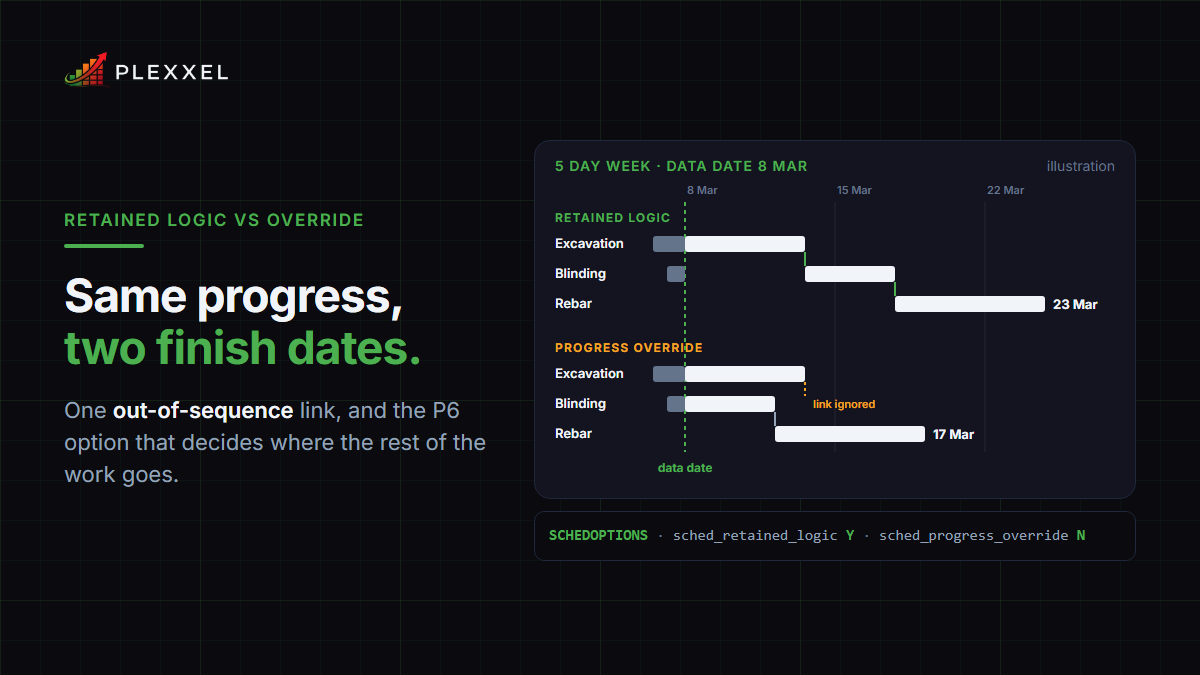
You enter this month's actual starts, actual finishes and remaining durations, press F9, and a handful of activities land on dates nobody on site recognises. Total float on some of them has moved by weeks. The relationships look right. So do the calendars. Before you touch a date, find the activities that started before their predecessors finished, then check how the project is set on retained logic vs progress override.
That one option decides where P6 puts the rest of an out-of-sequence activity. Retained logic keeps the relationship in force for the work that's left, so the remaining duration waits for the predecessor to finish. Progress override ignores the relationship once the activity has started, so the remaining duration runs from the data date. Same progress, two forecasts, and retained logic's is never the earlier of the two.
One link, two forecasts
A small example on a five day calendar, data date Monday 8 March:
- Excavation, Zone C is in progress with 4 days remaining.
- Blinding, Zone C follows it finish to start. Site started it on the dry half last week, before excavation finished, and it has 3 days remaining.
- Rebar, Zone C follows blinding finish to start. Not started, 5 days.
Blinding is out of sequence: it has an actual start, and its finish to start predecessor has no actual finish.
Retained logic holds blinding's remaining work behind the link. Excavation finishes on Thursday 11 March, blinding's 3 days run on the 12th, 15th and 16th, and rebar runs 17 to 23 March.
Progress override lets blinding carry on from the data date. It finishes on the 10th, rebar runs 11 to 17 March, and excavation still finishes on the 11th, with blinding no longer waiting for it.
Four working days apart on rebar, from one link. P6 is right both times. It did what the option told it to.
The float swing comes from the same place. Under retained logic, any slip on excavation passes straight through blinding into rebar, so that chain loses float or moves the finish date, depending on whether it's already the longest path. Under override, the chain gets those days back. And because the option covers the whole project, changing it moves every out-of-sequence activity at once, including ones nobody progressed this month.
One more catch. Retained logic carries dates through finished work too. If blinding had been completed last week while excavation still had 4 days to go, rebar would still wait for excavation and couldn't start before the 12th, because P6 hands the predecessor's finish on through the completed activity. Under override, rebar would start on the data date.
Retained logic vs progress override: when each is right
Neither one is the correct setting. They answer different questions about the same site.
Retained logic is right when the predecessor still holds back the rest of the work. If the wet half of Zone C can't be blinded until the excavator is out of it, blinding really can't finish before excavation does, and the later date is the honest one. It's also the cautious choice: it assumes the logic you drew still applies until someone changes it.
Progress override is right when the relationship stopped mattering once work began. Some finish to start links are habits, not constraints, and site has just proved it. Override is also a fair one-off question: if the contractor is right that the link no longer applies, when do they finish?
Each fails in the mirror image of the other. Retained logic can hold back work that was never really waiting, and report a delay nobody on site will recognise. Override can drop a link that still matters and give you a finish date that needs two crews in the same excavation on the same day.
My view, and plenty of planners work the other way: keep retained logic, and never switch to progress override because the dates look wrong. The option applies to every activity in the project and records no reason. If a link is wrong, change that link, where a reviewer can see what you did.
Check which option the file uses
In P6 it's under Tools, Schedule (F9), Options, on the General tab: When scheduling progressed activities use, with Retained Logic, Progress Override and Actual Dates. It sits on the same tab as the setting that decides which calendar a lag uses, and both are stored per project, so they travel with the XER. I'm leaving Actual Dates aside here. I wouldn't pick it for a routine monthly update without trying it on a copy first.
Without P6, open the XER in a text editor and search for SCHEDOPTIONS. There's one row per project, and two of its fields are sched_retained_logic and sched_progress_override, each Y or N.
Tip: On a contractor's file, a finish date that improved this month with no logic changes is the first thing to test against this row. Progress override can pull a forecast in without a single edit to a relationship, and if it's on, the narrative should say so. It's now one of the checks I run on every monthly update.
Find the out-of-sequence links, then fix them
The option only matters where an activity has started and a predecessor hasn't finished. In an XER, take the TASKPRED rows and look up both ends in TASK. A link where the successor has an act_start_date and the predecessor has no act_end_date is one to look at. P6's schedule log lists out-of-sequence activities too, if you tick Log to file before you schedule.
Then fix each one by what's true on site. The right change depends on three things: the predecessor's status, the successor's status and the link type. That's why the shortcut of turning every broken finish to start into start to start is sometimes wrong.
1. Both started, linked finish to start
The case in the example. The work overlapped, but blinding usually still can't finish until excavation does. Change the link to finish to finish. Under retained logic, blinding's finish is then held to the 11th and rebar runs 12 to 18 March: one working day later than override's answer, three earlier than the broken link's.
2. Successor started, predecessor not started
The successor plainly didn't need the predecessor finished. Start to start is often nearer the truth, and sometimes the honest answer is that there was never a dependency and the link should go.
3. Successor finished, predecessor still running
The pass-through from earlier. Decide whether the next activity really waits for the predecessor. If it does, link them directly so the reason is visible. If it doesn't, the old link is the only thing holding it, and that's the one to change.
Whatever you change, reset the lag and decide it again. Two days of lag on a finish to start doesn't mean the same thing on a finish to finish.
Then press F9 again and compare the two XER files in Excel to see which dates moved and why. If rebar still lands later than site expects, something you can name is holding it. That's a conversation for the progress meeting, not the options dialog.