An update comes back from the client's reviewer with one line: fails the DCMA 14 point schedule assessment on missing logic and hard constraints, please resubmit. Two days later the same programme passes. The finish date is where it was and nothing changed on site. What changed is that the constraints are gone and every open end now ties into the finish milestone.
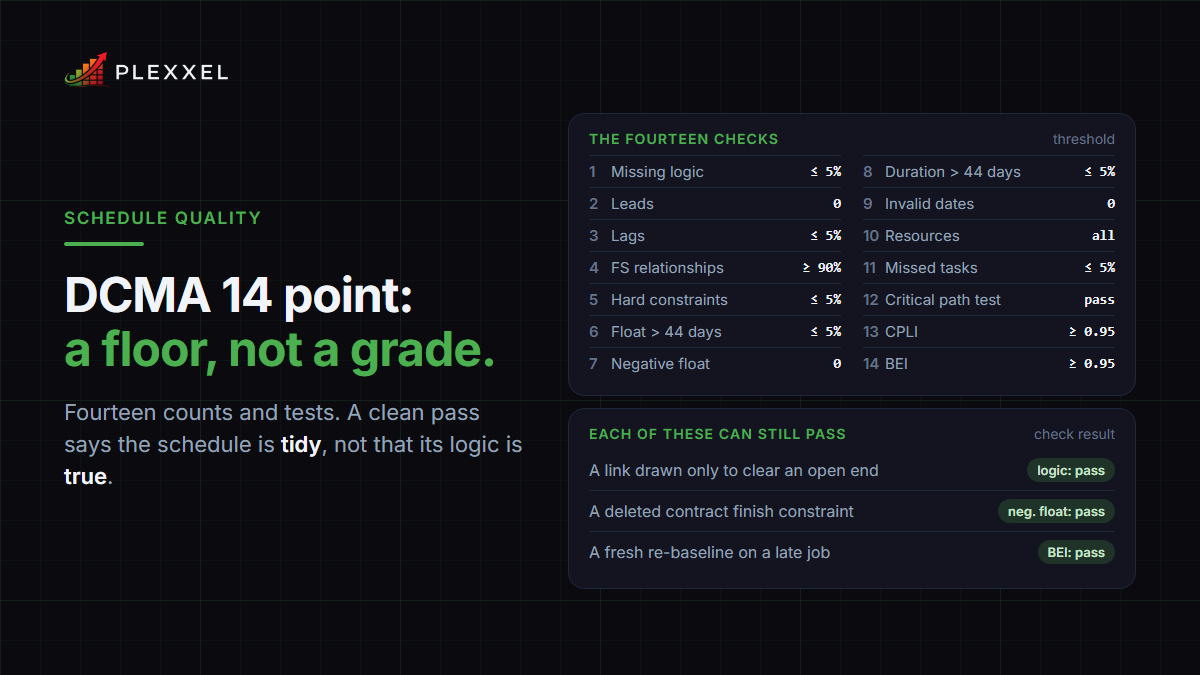
The DCMA 14 point schedule assessment is fourteen mechanical checks written by the US Defense Contract Management Agency to screen contractors' schedules on defence programmes. Most are a count with a threshold, usually 5 percent of incomplete activities, and the last few test the critical path and progress against the baseline. A pass tells you the schedule is built tidily. It doesn't tell you the logic is true.
I run it on every schedule I'm handed. I just don't believe the score on its own, and I don't think you should either.
What the DCMA 14 point schedule assessment checks
Here are the fourteen, grouped the way I read them, with the P6 field each one counts. "Incomplete" means a status_code other than TK_Complete. Most tools also leave out level of effort activities (task_type TT_LOE) and WBS summary activities, though they don't all agree on milestones.
Logic: checks 1 to 4
Missing logic on no more than 5 percent of incomplete activities, meaning no predecessor, no successor, or neither. Leads: no relationship at all with a negative lag_hr_cnt. Lags: positive lags on no more than 5 percent of relationships. Relationship types: at least 90 percent of pred_type values are PR_FS.
Constraints and float: checks 5 to 7
Hard constraints on no more than 5 percent of incomplete activities. Total float above 44 working days on no more than 5 percent. Negative float on none. These read cstr_type and total_float_hr_cnt, and that float is stored in hours, not days.
Durations, dates and resources: checks 8 to 10
Baseline duration over 44 working days on no more than 5 percent. Invalid dates on none: no forecast date before the data date, no actual date after it. Resources: activities lasting a day or more should carry resources or cost. There's no percentage for this one. The expectation is all of them.
Against the baseline: checks 11 to 14
Missed tasks: no more than 5 percent of the activities due by the data date finished late or not at all. Critical path test: add a big delay to a critical activity and the project finish must move by the same amount. Critical Path Length Index (CPLI) of 0.95 or better. Baseline Execution Index (BEI), activities finished divided by activities due, of 0.95 or better.
Missed tasks and BEI need baseline dates, and the critical path test needs something that can recalculate the network. Almost everything else comes straight out of one XER: TASK, TASKPRED, TASKRSRC and the data date in the PROJECT table.
The myth: a pass means the schedule is sound
Every one of the fourteen counts something. None of them asks whether it's true.
Look at what fixed the update in the opening. The logic check counts activities with no predecessor or successor. It can't tell a real driving link from a line drawn to the finish milestone to make the count go down. Those ties give the activities huge float, so the high float check might fail next. A few more links to whatever happens to sit nearby fixes that too. Every one of those links counts as logic, and the score comes back clean.
Lags go the same way. Turn an FS plus 10 day lag into a 10 day activity called "Wait" and the lag check passes, though the plan is identical. A lag has its own trap anyway, since its hours count on a calendar you may not have picked. Here's which calendar a lag actually uses in P6.
The one that bothers me most is negative float. DCMA wants none, and there are two ways to get there. Recover the time, or delete the finish constraint on the completion milestone. If the project has no Must Finish By date either, P6 has nothing to measure lateness against. The longest path drops to zero float, check 7 passes, and the schedule now shows a late job as on time.
Then missed tasks and BEI. Both measure against the baseline, so a re-baseline drawn from the current dates resets them to perfect overnight. Sometimes re-baselining is the right call. It is never a performance improvement.
So treat a clean score as the floor. It says the schedule is fit to be reviewed. Then the review starts.
Same XER, two tools, two scores
If you've run one file through two checkers and got different numbers, neither one is necessarily broken. The definitions leave gaps, and every tool fills them its own way.
The denominator. Five percent of what? All activities, incomplete ones, or incomplete ones minus milestones and level of effort? An LOE activity takes its dates from the activities it's tied to, so it routinely runs longer than 44 days. Leave it in and it fails the high duration check for doing its job.
Which constraints are hard. DCMA's list reads Must Start On, Must Finish On, Start No Later Than and Finish No Later Than. P6 writes Start On (CS_MSO), Finish On (CS_MEO), Start On or Before (CS_MSOB), Finish On or Before (CS_MEOB), plus Mandatory Start and Mandatory Finish. Mapping one list onto the other is a judgement call. Some checkers count only the two mandatory types, some add Start On and Finish On, some follow DCMA's wording and add both "or Before" types as well. The same file can pass in one tool and fail in another.
The secondary constraint. P6 lets an activity carry two constraints, and the second sits in cstr_type2. A check that reads only cstr_type never sees it.
Tip: 44 working days is 352 hours on an 8 hour calendar and 440 on a 10 hour one. Convert total_float_hr_cnt with each activity's own calendar (day_hr_cnt in the CALENDAR table). A checker that divides everything by 8 flags activities on a 10 hour calendar once they pass 35.2 real days of float.
How I'd use the assessment instead
Report the activity lists, not the score. A line saying "high float 7 percent, fail" starts an argument about the threshold. The list of activities behind it, with their IDs, starts a conversation about missing logic, which is the conversation you wanted.
Read checks 1 to 4 first. If the logic is bad, float and the critical path test are calculated on a network you can't trust, so there's nothing to gain from arguing about them yet. It's the same order I follow in the five things I check on every monthly update.
When an update suddenly passes after failing, don't accept the new score. Diff it against the version that failed. Comparing two XER files in Excel takes an afternoon the first time, and deleted constraints or a pile of new links into the finish milestone stand out quickly.
And hold the thresholds lightly. They are defaults written for defence contracts, not a law of construction. 44 working days is about two months, which suits most building work and is tight for a fabrication package that genuinely takes six. If your contract names the DCMA metrics, meet them. If it doesn't, agree the thresholds with the reviewer in writing before the first submission.
Pass it, then review it. The fourteen numbers tell you the schedule is ready to be read. Reading it is still your job.