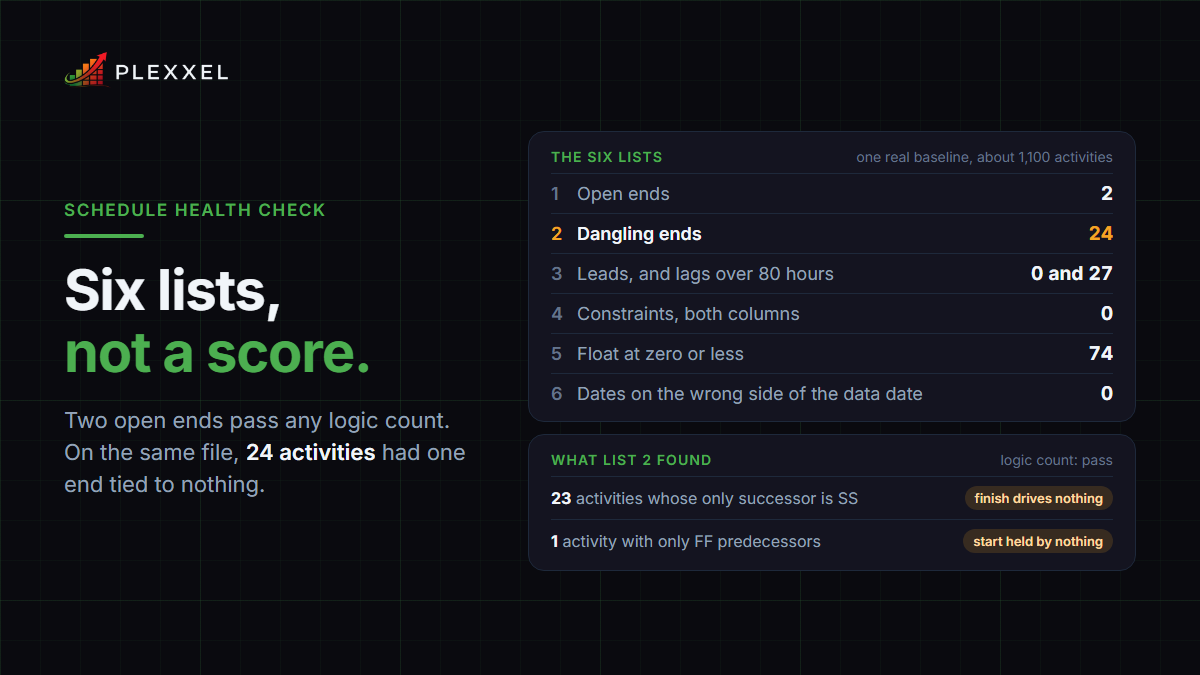
The contractor's baseline arrives with a covering letter saying the programme "has passed a schedule health check". No report attached, just that sentence. You've got the XER, a week to accept it or send it back, and nothing yet that you'd put your name to.
So run it yourself. A schedule health check is a set of mechanical tests on one schedule file. It asks whether every activity is tied into the network at both ends, whether each lag and constraint can be explained, whether the float means what it seems to, and whether the dates respect the data date. All of it can be done in Excel from three tables in the XER, and what I want out of it is six lists of Activity IDs. Not a score.
Allow an hour the first time. After that the formulas stay in the workbook, and each new file is a few pastes.
Three tables, and the paste that goes wrong
An XER is tab separated text, so the tables come out with copy and paste. I covered the mechanics when comparing two XER files in Excel: find the %T line that names the table, copy from the %F line down to the last %R row, paste into A1, delete column A, press Ctrl+T. Do that for TASK, TASKPRED and CALENDAR, and name the tables Acts, Links and Cals. Then copy last_recalc_date, the data date, from the PROJECT table into a spare cell and name that cell DataDate.
CALENDAR is the one that bites. Its clndr_data field holds the whole calendar definition, and an Excel cell stops at 32,767 characters. On one of my files that field runs to 37,135. Excel cuts it and drops the remainder onto a row of its own, one that doesn't start with %R. Delete those rows before you delete column A. Leave them and the table ends at the first gap, so every activity on a calendar further down returns #N/A later.
One note on the formulas. Excel writes a this-row reference to an XER field with a second pair of brackets, [@[task_id]], and that's how they're written below.
The schedule health check, list by list
Add the helper columns to Acts once. After that, every list is a filter.
1. Open ends
Two counts per activity. Preds is =COUNTIF(Links[task_id],[@[task_id]]) and Succs is =COUNTIF(Links[pred_task_id],[@[task_id]]). In TASKPRED, task_id is the successor end of a link and pred_task_id the predecessor end. A zero in either column is an open end, and the answer you're hoping for is two: the first milestone and the last.
2. Dangling ends
An activity can have links and still be tied at one end only. Its start is held only by an FS or SS predecessor. Its finish pushes something only through an FS or FF successor. StartTied is =SUM(COUNTIFS(Links[task_id],[@[task_id]],Links[pred_type],{"PR_FS","PR_SS"})). FinishTied is the same count on pred_task_id with {"PR_FS","PR_FF"}. Preds above zero with StartTied at zero is a dangling start. Succs above zero with FinishTied at zero is a dangling finish.
3. Leads and long lags
Filter Links on lag_hr_cnt below zero for the leads, then sort it largest first for the lags. The values are hours. To put Activity IDs on the rows, add =XLOOKUP([@[pred_task_id]],Acts[task_id],Acts[task_code]) and the same for task_id (INDEX and MATCH before Excel 2021). Every long lag gets one question: what happens in that gap, and why isn't it an activity?
4. Constraints, both columns
Filter cstr_type for anything that isn't blank, then again on cstr_type2, the secondary constraint that most reviews never open. The codes are P6's own: CS_MSO is Start On, CS_MEOB is Finish On or Before, CS_MANDFIN is Mandatory Finish. Each row needs a reason you can point to, like an access date or a contract milestone. "It held the date" isn't one.
5. Float in days, on the right calendar
Float is stored in hours, and the divisor is the activity's own calendar. HrsDay is =XLOOKUP([@[clndr_id]],Cals[clndr_id],Cals[day_hr_cnt]). FloatDays is =IF([@[total_float_hr_cnt]]="","",[@[total_float_hr_cnt]]/[@HrsDay]). The IF matters, because P6 leaves float blank on completed activities and Excel turns blank divided by anything into zero. On a 300 activity update I test with, leaving the IF out puts 258 rows at zero or less. The real critical list, zero or less on activities that aren't TK_Complete, has 78.
6. Dates against the data date
Two flags. An actual in the future: =OR([@[act_start_date]]>DataDate,[@[act_end_date]]>DataDate). And unfinished work left in the past: a status_code other than TK_Complete with an early_end_date before DataDate. On a file that was scheduled after the data date moved, both lists should be empty. If the second one isn't, the schedule probably wasn't recalculated, and nothing else in the file is worth reading yet.
Tip: Leave level of effort and WBS summary rows (task_type TT_LOE and TT_WBS) out of lists 1 and 2, because they take their dates from other activities. Skip the milestones on list 2 as well. A milestone has no duration, so one link ties both of its ends.
Two open ends, 24 dangling ones
List 2 is why I don't trust a logic count. I ran all six on a real baseline of just under 1,100 activities. Open ends: two, the start milestone and the finish milestone. Any missing logic test passes that file, including the first of the DCMA 14 point checks, which counts only activities with no predecessor or no successor.
The dangling list had 24 ordinary activities on it. One had nothing but FF predecessors, so no link held its start. The other 23 each had a single successor, and it was an SS link. Their finishes push nothing. Let any one of them run three weeks over and the completion milestone doesn't move by a day.
Six of those 23 sit at zero float, so they're on the critical list too. Only their start is critical. P6 takes the late start from the SS successor and adds the duration to get the late finish, so the float comes from the successor's start and not from anything the finish drives. The schedule calls the activity critical and still can't see it overrun.
I think a dangling end is the worse defect of the two. P6's own schedule log counts the activities without predecessors or successors every time you schedule, so sooner or later somebody looks. The log doesn't count these, and neither does the DCMA logic check.
The same file had a 600 hour FS lag between two ordinary activities. Both sit on a 10 hour calendar, so that's 60 working days with nothing drawn in them. (It's worth checking which calendar a lag's hours are counted on before you quote a number like that.) And dividing every float value by 8 put 957 activities over 44 days. On their own calendars it's 903.
If you'd rather not keep the workbook
The free tier of Plexxel has this as Schedule Audit. It reads one XER and writes nine sheets, among them Open-Ends, Dangling activities, a lead check, Constraints with the secondary ones included, Float Check and Critical Activities. Float is converted on each activity's own calendar, and a blank float never counts as critical. It also lists activities whose calendar differs from their resource's, which I haven't attempted by hand here. What it doesn't do: it counts lags without listing the long ones, and it doesn't test dates against the data date. Keep lists 3 and 6.
What six clean lists don't prove
That the plan is right.
A file can come through all six with nothing on them and still start the cladding before the frame is finished, or carry a 15 day duration for work that needs 40. The health check finds the places where the network can't carry a delay through to the finish date. Whether the sequence and the durations are believable is the next review, and that one needs someone who knows the job.
So answer the covering letter with the lists. Twenty-four Activity IDs, each with its loose end marked, take a lot more answering than "has passed" did.